SASSA SRD, or Social Relief of Distress grant, provides essential financial aid to South Africa’s most vulnerable. Administered by the South African Social Security Agency, it targets unemployed adults aged 18-60. You can perform a quick status to stay updated on your application.
Recipients must have no other income sources, passing a strict means test each month. Introduced amid the COVID-19 crisis, this temporary lifeline combats hunger and distress.
It ensures basic needs like food and shelter for those without UIF or other grants.
How to Check Your SRD SASSA Status (Official Methods Explained)
Checking your SRD status is important to stay informed about your SASSA grant application, upcoming payment dates, or any possible issues.
SASSA offers several ways to check your status, online, via mobile, or offline, ensuring that all applicants can easily access the information.
Online Methods
The official SC19 portal is the main online method to check your SRD R370 application and payment status securely. It provides real-time updates using your ID number and registered mobile number.
Using the official SASSA SRD Portal
The official SC19 portal is the primary online platform for checking your SRD r370 status.
Step-by-step guide
- Go to the official portal
- Enter your ID number.
- Complete any required captcha verification.
- Click “SRD status check.”
- Review your application details and take note of any actions needed.
It is updated regularly, ensuring that all status information is current and accurate for beneficiaries.

The portal shows whether your SASSA application is approved, declined, or pending, along with any required actions.
Mobile Methods Guides
You can easily perform a SASSA status check using your mobile phone via WhatsApp, USSD, SMS, or mobile apps.
WhatsApp SRD Status Check Guide
- Open WhatsApp and add +27 82 046 8553 as a contact.
- Send a message with your South African ID number.
- You will receive a menu with options like:
- 1 – Check SRD Status
- 2 – Payment Dates
- 3 – Banking Details Update
- Reply with 1 to check your SRD status.
- The system will respond with your application status: Approved, Declined, Pending, or Awaiting Identity Verification.
- If additional action is required (e.g., update banking details), the WhatsApp menu will give instructions and links.
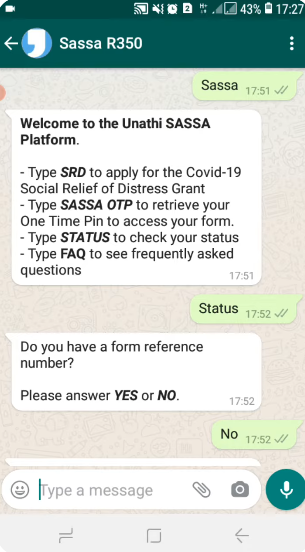
USSD Code For SRD Status Check Guide
- Dial *134*7737# on your mobile phone.
- A menu will appear:
- 1 – SRD status check
- 2 – Confirm Payment Dates
- 3 – Update Banking Details
- 4 – Appeals Information
- Enter 1 to check your SRD status.
- The system will prompt you to enter your ID number.
- You will receive a message showing your status: Approved, Declined, Pending, or Awaiting Identity Verification.
- If your grant is approved, it will also show the next payment date.
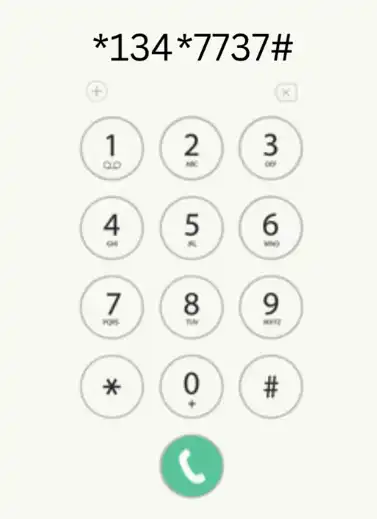
SMS Status Check Method
For SASSA status check, SMS your South African ID number to 082 046 8553. You’ll receive a reply with your SRD status, grant type, and payment date if approved.
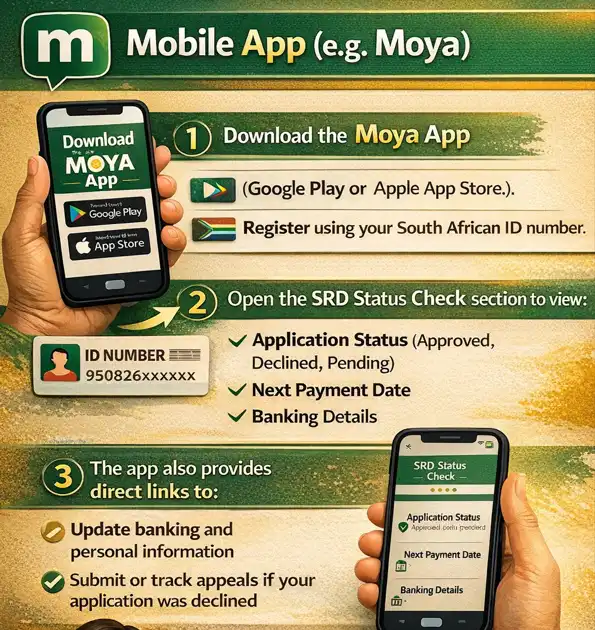
Mobile App (e.g., Moya)
- Download the Moya App from your app store.
- Register with your ID number.
- Go to the SRD Status check section to view:
- Application Status (Approved, Declined, Pending)
- Next Payment Date
- Banking Details
- The app also provides direct links to update information or lodge appeals if needed.
Offline Methods
If you prefer traditional methods, you can check your SRD status by calling SASSA or visiting your nearest SASSA office for full assistance.
Phone Call
Call 0800 60 10 11, provide your South African ID number, and the agent will guide you to check your application status, payment dates, or update banking details.
Visit a SASSA Office
Bring your ID to a nearby SASSA office. Staff can:
- Check your application status
- Explain any pending issues
- Assist in updating banking details or lodging appeals
Key Differences: SRD R370 vs R350
The R350 grant, introduced in 2020 as immediate pandemic relief, provided monthly support of R350. It assisted millions until 2024 but was gradually phased out in early 2026 due to economic changes.
The R370 grant succeeded it, raising the amount to address rising inflation. Eligibility rules remain the same, with no changes to the income threshold of under R624 or residency requirements.
R370 payments are consistently made between the 25th and 31st of each month. Duplicate claims are strictly prohibited to prevent misuse across both grant programs.
Why Check SASSA Status Regularly?
First, a sassa status check allows applicants to confirm whether their application has been approved, declined, or is pending, helping them plan their finances accordingly.
Second, it provides insights into any issues with identity verification or banking details that may delay payment.
Finally, regularly checking your status ensures that you stay informed about SASSA updates, payment dates, and any actions required to maintain eligibility.
Staying proactive can save time and prevent unnecessary delays in receiving your grant.
Confirmed SASSA SRD R370 Payment Dates 2026
Knowing the exact SASSA SRD payment dates for 2026 is essential for all applicants receiving the R370 or R350 grant.
SASSA typically disburses payments monthly, and each month has a confirmed date that ensures recipients receive their funds on time. Here you can get all the details.
| Month | Old Age Grant | Disability Grant | Child Support Grant |
|---|---|---|---|
| November 2025 | 04/11/25 | 05/11/25 | 06/11/25 |
| December 2025 | 02/12/25 | 03/12/25 | 04/12/25 |
| January 2026 | 06/01/26 | 07/01/26 | 08/01/26 |
| February 2026 | 03/02/26 | 04/02/26 | 05/02/26 |
| March 2026 | 04/03/26 | 04/03/26 | 05/03/26 |
Being aware of the payment dates allows recipients to manage their budgeting effectively, especially if they rely on the grant for groceries, utility bills, or rent.
It is recommended to mark the confirmed payment dates on your calendar or set reminders on your phone to avoid missing updates or notices from SASSA.
Tips to Plan Your Finances Around Payment Dates
Being aware of the payment dates allows applicants to manage their finances effectively and ensures that essential expenses are paid on time.
SASSA may also issue updates if there are changes, such as emergency payments or adjustments due to national events or crises.
For recipients of the SRD R370 or R350 grants, knowing the monthly payment schedule reduces uncertainty and provides peace of mind.
Staying informed helps applicants access the support they need promptly, avoiding unnecessary stress or delays.
Types of SASSA Grants You May Qualify For
SASSA provides several social grants to support South Africans in need, helping them cover essential living expenses.
Depending on your circumstances, you may qualify for grants like the SRD, Child Support, Disability, or Older Person’s Grant.
Social Relief of Distress (SRD) Grant
The SRD grant provides temporary financial support to individuals facing urgent financial hardship.
It is available to unemployed South Africans who do not receive any other social grant.
The grant ensures beneficiaries can cover basic living expenses such as food, transport, and utilities.
Applicants must meet income and asset criteria and provide valid identification during the application process.
Child Support Grant
The Child Support Grant helps caregivers provide for children under the age of 18.
It aims to cover essential needs like food, school supplies, and clothing.
Eligibility requires that the child is a South African citizen, permanent resident, or refugee.
The caregiver’s income must fall within SASSA’s prescribed limits, and proper documentation must be submitted.
Disability Grant
The Disability Grant assists individuals who cannot work due to permanent or temporary disability.
It provides monthly financial support to meet basic living requirements.
Applicants must provide medical proof of disability and meet income and asset requirements.
This grant ensures that disabled individuals have financial independence and access to essential resources.
Older Person’s Grant
The Older Person’s Grant is for South Africans aged 60 and above.
It provides a steady monthly income for seniors who may not have other financial support.
Applicants must meet income and residency criteria and present a valid South African ID.
This grant helps older citizens cover medical, housing, and daily living expenses.
Foster Child Grant
The Foster Child Grant supports children under foster care arrangements.
It ensures foster parents or caregivers have financial assistance to care for children removed from their biological parents.
Eligibility requires legal documentation of foster care placement and proof of the child’s age and residency.
Grant-in-Aid
The Grant-in-Aid provides financial support to those who already receive a social grant but require additional help.
It is commonly granted to people who need assistance for daily activities due to severe disability or health conditions.
Applicants must already be receiving a primary grant and provide medical evidence of their need.
Understanding Your SRD Status
Performing an SRD status check is important to ensure you receive your SASSA grant on time and to identify any issues that could delay payment.
SASSA uses different status categories to indicate the stage of your application and whether any action is required from you.
Status Meanings: Approved, Declined, Pending, Awaiting Identity Verification
| Approved Your SRD application has been accepted, and your grant will be paid according to the scheduled payment dates. | Declined Your application did not meet the eligibility criteria. You may appeal if you believe your application was wrongly assessed. | Pending Your application is still under review. No payment will be processed until the review is complete. | Awaiting Identity Verification SASSA has received your application, but your identity documents require verification. |
If your identity verification fails, your application may be declined or delayed until the issue is resolved.
What “Alternative Income Source Identified” Means
This status shows when SASSA’s system identifies potential additional sources of income that could impact your eligibility.
It does not automatically mean you are ineligible, but you may need to submit extra documents to verify your financial situation.
SASSA might ask for bank statements, payslips, or other proof of income to review your application.
Once you provide the requested information, your status will be updated in the system.
Payment Not Processed Yet
Sometimes, your application may be approved, but the payment has not been processed.
This can happen due to banking delays, system updates, or the timing of monthly disbursements.
Always check your banking details to ensure they are correct and match the SASSA records.
If your account information is pending or incorrect, SASSA cannot deposit your grant.
Common SRD Issues and How to Troubleshoot
Incorrect or Pending Banking Details: Update your banking details online, via WhatsApp, USSD, or at a SASSA office.
Failed Identity Verification: Ensure your ID is valid and matches the submitted documents. Visit a SASSA office if the problem persists.
Alternative Income Source: Provide accurate proof of income or unemployment to SASSA to resolve the issue.
Technical or System Delays: If your SASSA status is not updating, wait 24–48 hours and check again, or contact SASSA via phone, WhatsApp, or SMS.
By understanding the different SRD statuses and how to troubleshoot common issues, applicants can ensure timely grant payments and minimize unnecessary delays, making the SASSA status check meaning clear and actionable.
Banking & Identity Verification
Proper banking details and verified identity are essential for receiving your SASSA SRD grant on time.
Many delays in payment occur due to incorrect banking information or identity verification issues.
Understanding how to update your details and fix verification problems ensures you receive your grant without interruption.
How to Update Banking Details?
If your account information has changed or is incorrect, you must update it with SASSA online through the SC19 portal or at a SASSA office.
Steps to update online:
- Log in to the SC19 portal with your South African ID number.
- Navigate to the Banking Details section.
- Enter your new bank account number and bank name.
- Submit the changes and wait for confirmation.
If you cannot access the portal, visit your nearest SASSA office with your valid ID and bank details. Staff will update your account information for you.
Updating your banking details promptly prevents delays in receiving your grant and avoids rejected payments.
What “Banking Details Pending” Means
This status means SASSA has received your banking details but has not yet confirmed them and you can wait for a time to confirm it through the SASSA status check.
Until the bank account is verified, payments will not be processed.
It is important to double-check that your account number and bank name are accurate and match your official bank records.
If the information is incorrect, SASSA will not deposit your grant, and you may need to resubmit details.
How SASSA Verifies Identity?
SASSA verifies each applicant’s identity using government databases, including the Home Affairs system.
The verification ensures that the ID number submitted is valid, belongs to the applicant, and matches SASSA’s records.
During this process, SASSA may request supporting documents, such as an ID book, smart ID card, or birth certificate.
Identity verification is crucial to prevent fraud and ensure that grants go to eligible recipients.
Fixing Failed Identity Verification
If your identity check fails, your SRD application may be declined or delayed.
Common reasons include incorrect ID numbers, expired documents, or mismatched personal information.
To fix this:
- Verify that your ID number is correct and matches your official documents.
- Update any personal information if it has changed, such as name corrections.
- Visit a SASSA office with your original ID or birth certificate for manual verification.
Once verified, SASSA will update your status, allowing your grant to be processed and you can follow it through SRD status check.
SASSA SRD Appeals
If your SASSA SRD grant application has been declined or you have encountered issues with your payment, you have the right to submit an appeal.
Understanding the appeal process and following the correct steps increases your chances of reinstating your grant without delays.
How to Submit an Appeal Online
- Visit the official SASSA SRD SC19 portal.
- Log in using your South African ID number and your application reference number if available.
- Navigate to the Appeal section of the portal.
- Select the reason for your appeal, such as:
- Application Declined
- Banking Details Issue
- Identity Verification Issue
- Upload any supporting documents that strengthen your appeal, such as:
- Bank statements
- Updated ID documents
- Proof of unemployment
- Submit your appeal and note the confirmation number for reference.
- Keep a copy of your submission or screenshot for your records.
Submitting your appeal online ensures that it is received immediately and processed in the official SASSA system.
How to Check Your Appeal Status?
After submitting your appeal, you can check its status using the SC19 portal or by contacting SASSA directly.
- Log in to the portal and go to the Appeal Status section.
- Enter your ID number and appeal reference number.
- The portal will display whether your appeal is:
- Under Review
- Approved
- Declined
- If your appeal is approved, the system will indicate when your grant will be reinstated.
Regularly SASSA status check keeps you informed and allows you to respond quickly if additional documents are requested.
Tips for Reinstating Your Grant
- Ensure all your personal information and banking details are accurate.
- Submit clear and complete supporting documents to strengthen your appeal.
- Be precise in explaining why you believe your application was wrongly declined.
- Follow up promptly if SASSA requests additional information.
- Keep a record of all communication with SASSA regarding your appeal.
Following these tips reduces delays and increases the likelihood of a successful appeal.
Important Points to Remember During Appeals
- Appeals must be submitted within the stipulated time after your application is declined.
- Only genuine applications will be considered; submitting false documents can result in permanent disqualification.
- Keep your contact information updated so SASSA can communicate any decisions or requests.
- Even after your appeal, processing may take time due to verification and internal reviews.
- If your appeal is declined again, you can request further guidance from SASSA or visit a local office.
Being aware of these points ensures you navigate the appeals process efficiently and increase your chances of receiving the grant.
Contact & Support
If you encounter issues with your SASSA SRD grant, such as delays in payment, banking problems, or identity verification, contacting SASSA directly is the most effective way to get assistance.
Knowing the correct channels ensures your concerns are addressed promptly.
How to Contact SASSA for SRD Assistance
SASSA provides multiple ways for beneficiaries to get support.
You can reach out for help regarding your application status, banking details, appeal submissions, or general SRD inquiries.
Before contacting SASSA, have your South African ID number and application reference number ready.
Providing accurate details helps the agent or system give you correct information quickly.
Recommended Contact Methods
WhatsApp
Send a message to +27 82 046 8553 with your ID number.
The system provides options for checking your SRD status, payment dates, and grant issues.
Phone
Call the SASSA call center at 0800 60 10 11.
Agents are available to assist with status updates, appeal guidance, and banking issues.
Office Visits
If you prefer in-person assistance, visit your nearest SASSA office.
Bring your valid South African ID and any supporting documents related to your SRD grant.
Office staff can help check your status, update banking information, and provide guidance for appeals.
Physical Offices and Head Office Info
SASSA has offices in every province to assist beneficiaries.
To find your nearest office, visit the SASSA website or call the toll-free number.
The SASSA Head Office is located in Pretoria:
Visiting the office ensures that complex issues, such as failed identity verification or appeals, are resolved with official support.
| Field | Details |
|---|---|
| Address | 150 Visagie Street, Pretoria, 0002 |
| Phone | 012 400 2000 |
| [email protected] |
FAQ’s
How do I Perform SASSA Status Check online?
Visit the official SC19 portal, enter your South African ID number, and enter you ID number and phone number to view your SASSA application status.
You can also use the Moya App for real-time updates.
How do I change my SASSA phone number?
You can update your phone number by visiting SASSA official website https://srd.sassa.gov.za/sc19/contact with your valid ID.
How much is the SASSA Child Support Grant in 2026?
The Child Support Grant amount is R550 per month per child in 2026. It helps caregivers cover essential living costs for children under 18 years.
How much is the SASSA SRD R370 Grant in 2026?
Eligible applicants receive R370 per month. This grant supports unemployed individuals who do not receive any other social grant.
How do I change SASSA banking details?
Banking details can only be updated online via the SC19 portal or in-person at a SASSA office. Ensure your account details match official bank records.
How do I submit a SASSA appeal if my grant is rejected?
Submit your appeal online through the SC19 portal. Select the reason for your appeal, upload supporting documents, and submit for review.
How do I check the status of my SASSA appeal?
Log in to the SC19 portal and go to the Appeal Status section. Enter your ID and reference number to view if your appeal is under review, approved, or declined.
Why is my SASSA SRD status still pending?
Pending status means your application is under review, or additional verification is required. Check your banking details and ensure identity verification is complete to avoid delays.
Why was my SASSA application declined?
Applications may be declined due to income exceeding limits, failed identity verification, or incomplete documents.
You can submit an appeal if you believe the decision is incorrect.
How do I check SASSA payment dates for 2026?
Payment dates are given here and also announced monthly on the official SASSA website and updated portals.
You can also check via WhatsApp, USSD, or the Moya App.
Can I visit a SASSA office for help?
Yes, you can visit your nearest SASSA office for assistance with status checks, banking updates, and appeals. Bring your valid ID and any relevant documents.
Regularly monitoring your SASSA status check helps you stay informed about whether your application is approved, pending, declined, or awaiting identity verification.
Always keep your banking details and personal information up to date to avoid delays in receiving your grant. If your identity verification fails or banking details are pending, address the issue promptly by visiting a SASSA office or updating through the SC19 portal.
By staying proactive, you can ensure timely payments, avoid unnecessary stress, and take quick action if any problems arise. Remember, keeping track of your status and resolving issues early helps you receive the support you need when you need it.
